






Store credit used to be something you got at the mall when you returned a sweater without a receipt. On Shopify, it's become something quite different, a native feature that lets you keep revenue in your store, build customer relationships, and gives loyalty program apps, such as Froonze, another way to reward Shopify store customers alongside points, perks, and tiers.
This guide covers what Shopify store credit is, how it works in practice, how merchants are using it, and how to automate it so it scales beyond one-off goodwill gestures.
What is Shopify store credit?
Shopify store credit is a virtual balance you issue to a customer's account that they can apply at checkout as a payment method. It sits in their customer profile, displays at checkout when they're signed in, and gets used like cash for products in your store.
Unlike a discount code, store credit lives in your customer's account as a balance. They can spend it until it runs out (or expires, if you've set an expiration date). Unlike a cash refund, the money stays in your business. It's built directly into Shopify's checkout, customer accounts, and Shopify POS.
How Shopify store credit works
Issuing store credit
You can issue it in three ways:
- Manually from the admin. Go to a customer's profile in Shopify admin → Store credit section → click Edit balance → select Credit → enter the amount and optional expiration date. Staff need the Store credit and Edit store credit permissions to do this.
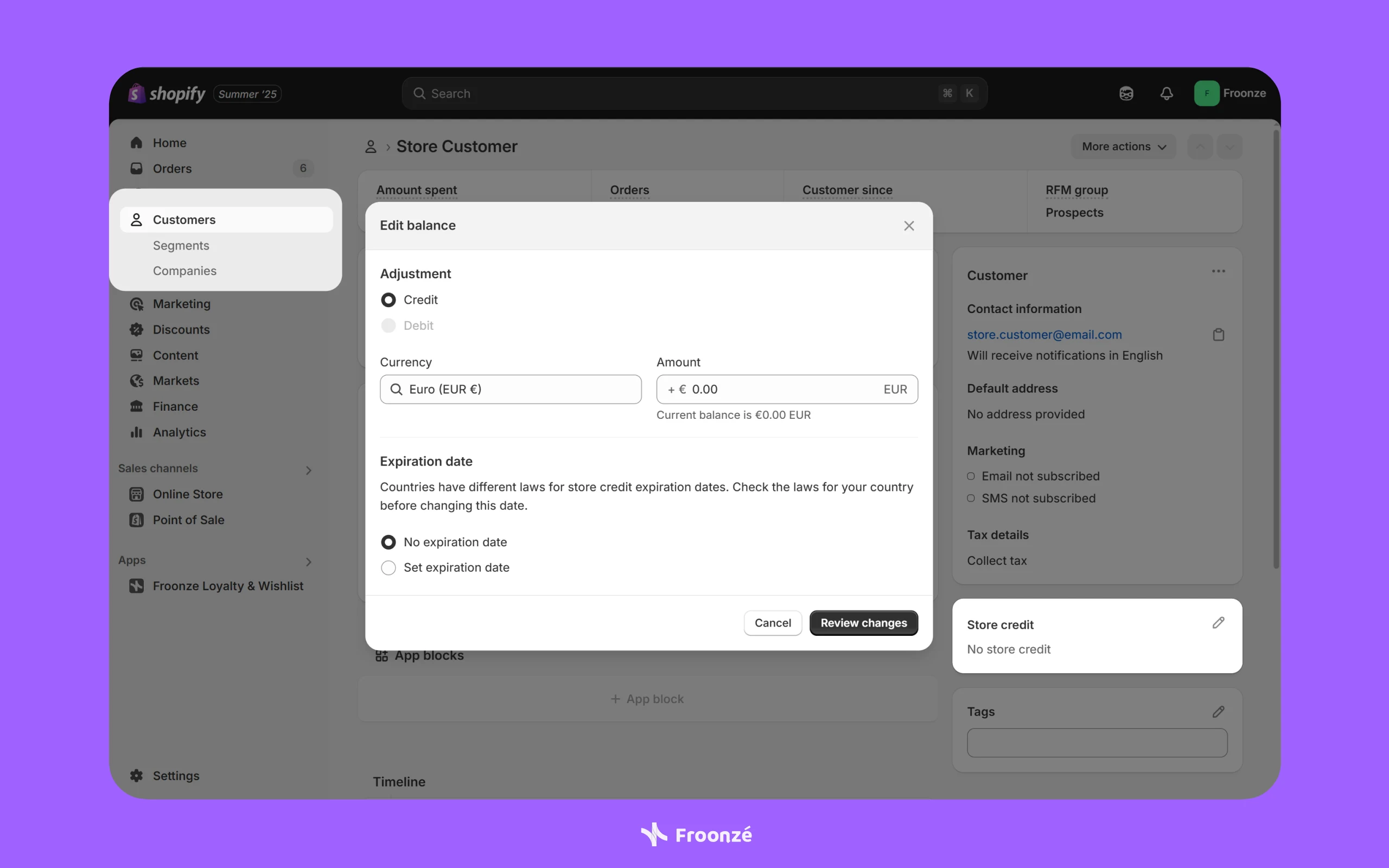
- Via the Shopify API. For developers or apps that need to issue credit programmatically.
- Through a third-party app that integrates with the store credit API. This is how loyalty apps automate issuance based on customer actions.
Where customers can use store credit
Store credit is accepted as a payment method on three channels:
- Online store
- Shopify POS
- Shop app
It's not available on other sales channels, and it can't be applied to draft orders or edited orders directly, though there's a workaround: send the customer an invoice from the draft order, and they can sign in and apply their credit themselves.
How customers apply store credit at checkout
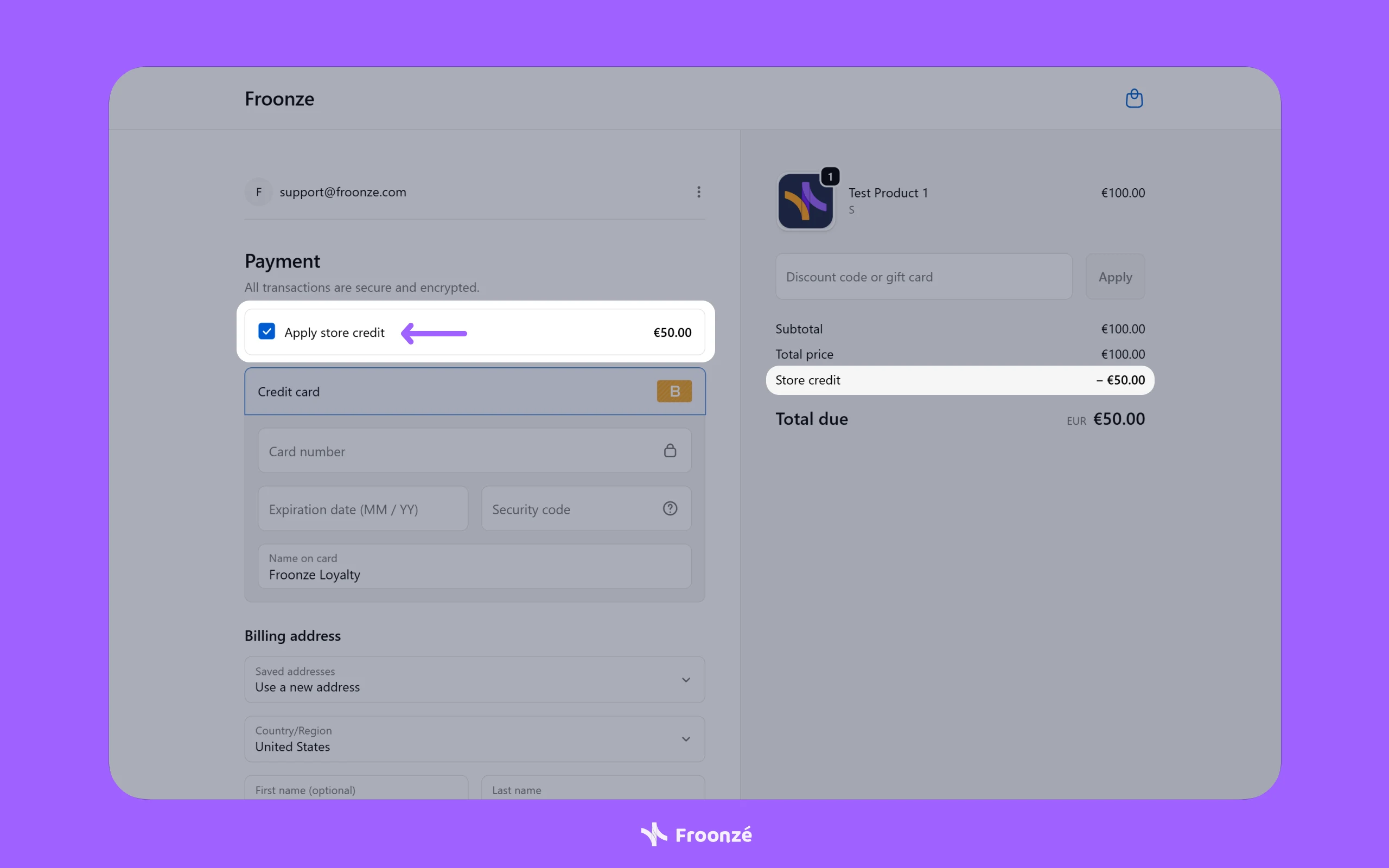
A customer must be signed into their customer account (or using Shop Pay) to see and use their store credit. At checkout, an Apply store credit option appears in the Payments section, showing their available balance. The customer can select it to apply their store credit.
Setting expiration periods for store credit
You can set expiration dates on individual credits. Credit expires at the end of the day in your store's time zone. When a customer has multiple credits with different expiration dates, Shopify automatically debits the one that expires soonest. Check local laws before setting expiration dates; some jurisdictions restrict this.
Limitations of Shopify store credit
Naturally, great new features come with limitations and things to be aware of. Below is a non-exhaustive list of aspects to keep in mind if you decide to implement store credit on your Shopify store.
The all-or-nothing store credit usage rule
During checkout, neither merchants nor customers can limit the amount of store credit that is applied to an order. Shopify applies all available store credit when store credit is used as a payment method. A customer with $50 in credit shopping a $20 order will use the full $50, $20 covers the order, and the remaining $30 stays in their balance for next time. There's no way for them to apply only part of their credit to "save" some for later.
Multi-currency behaviour of Shopify store credit
If a customer has store credit in multiple currencies on their account, only the balance matching the checkout currency will display as an option. A customer with $50 USD in credit shopping at a EUR checkout won't see their USD credit at all.
Shopify store credit and subscriptions
Customers can apply store credit to the initial purchase of a subscription, but not to recurring subscription bills.
B2B accounts and Shopify store credit
Store credit works for B2B, but it’s allocated at the company location level rather than the individual customer level. Credit issued on a customer profile is for D2C use only and can’t be used in a B2B online store. B2B store credit is applied to a company location, and B2B customers assigned to that location can use it.
Shopify store credit balance limit
A single customer account can hold up to $15,000 USD in store credit.
How Shopify merchants can use store credit
Store credit fills a specific gap in the merchant toolkit. It keeps revenue inside the business, it feels personal because it lives in one specific customer's account, and it redeems at checkout in a single click. Those qualities make it well-suited to a few common use cases.
Store credit as a refund alternative
This is the most common use. Instead of issuing a cash refund, offer store credit, often with a small bonus (refund $50, offer $60 in credit), to make the trade feel worthwhile. Shopify supports refunding directly to store credit for full orders, partial orders, returned items, and cancelled orders. The customer gets their money's worth, you keep the revenue, and the gesture often leads to a follow-up purchase.
Store credit as a loyalty reward
Store credit is being used as a loyalty reward currency. When customers complete loyalty actions, such as placing an order, celebrating a birthday, referring a friend, or leaving a review, merchants can issue store credit directly to their account. The credit appears in the customer's account and applies at checkout when they choose to use it. This is one of the use cases Froonze Loyalty handles natively, alongside points-based and tier-based rewards.
Store credit for win-back campaigns
No orders in the last 90 days? Drop $15 in the customer’s account and email them about it. The credit feels like money they already have, which gives them a concrete reason to come back.
Store credit for service recovery
Late delivery, damaged package, or support issue? Issuing store credit lets you make things right immediately without sending cash out the door, and turns a complaint into a reason to come back.
B2B credit allocation and store credit
For wholesale customers, store credit is a clean way to handle prepayment, volume rewards, or returns at the company location level without involving the finance team for every transaction.
The easiest way to automate store credit on Shopify
Issuing store credit manually works fine when it's a one-off, a refund here, a goodwill gesture there. It stops working the moment you want to do it systematically: every birthday, every order, every successful referral.
This is where automation comes in. Froonze Loyalty lets you set rules that automatically issue store credit when customers complete actions you want to reward:
- Install Froonze from the Shopify App Store.
- In the app dashboard, go to Loyalty → Earning rules.
- Pick an action ("Place an order", "Birthday", "Newsletter signup", "Social media share") and set the reward type to Store credit.
- Set the earning type: either increments of store credit (e.g. $1 in credit for every $10 spent) or a fixed amount of store credit (e.g. $5 per order).
- Save. From here, eligible customer actions automatically credit the customer's Shopify store credit balance.
Any credit earned will be in the customer's account when they next shop, and Shopify applies it at checkout when they choose to use it. No coupon codes to share, no manual issuing on your end.
You can also mix reward types, store credit for some actions, points for others, and tier-based VIP programs work the same way, where higher tiers can earn more credit per action. This is what turns store credit from a one-off gesture into a system that drives repeat purchases at scale.
For more information on how Froonze Loyalty works with Shopify native store credit, please refer to our dedicated Store Credit Loyalty Setup Guide.
Should you use Shopify store credit?
For most Shopify merchants on Customer Accounts (passwordless login), the answer is a clear yes. It's built into Shopify, requires no third-party apps to run the basics, and gives you a flexible way to turn refunds into future sales and reward customers for coming back.
The deciding question isn't whether to use it. It's how. If you're issuing credit occasionally for refunds and goodwill, the native admin tools are enough. If you want store credit working systematically as part of your customer retention strategy on every order, every birthday, every referral, then you'll want an automation layer to handle issuance based on rules instead of one customer at a time.
That's the role Froonze Loyalty plays. It allows you to set your earning rules, and let store credit accrue automatically based on what your customers do. You can run it as a pure credit-based program, combine it with points, or layer it into a VIP tier structure.
It’s time you see it in action and install Froonze! If it’s your first time installing the app, you’ll benefit from a 14-day free trial!