





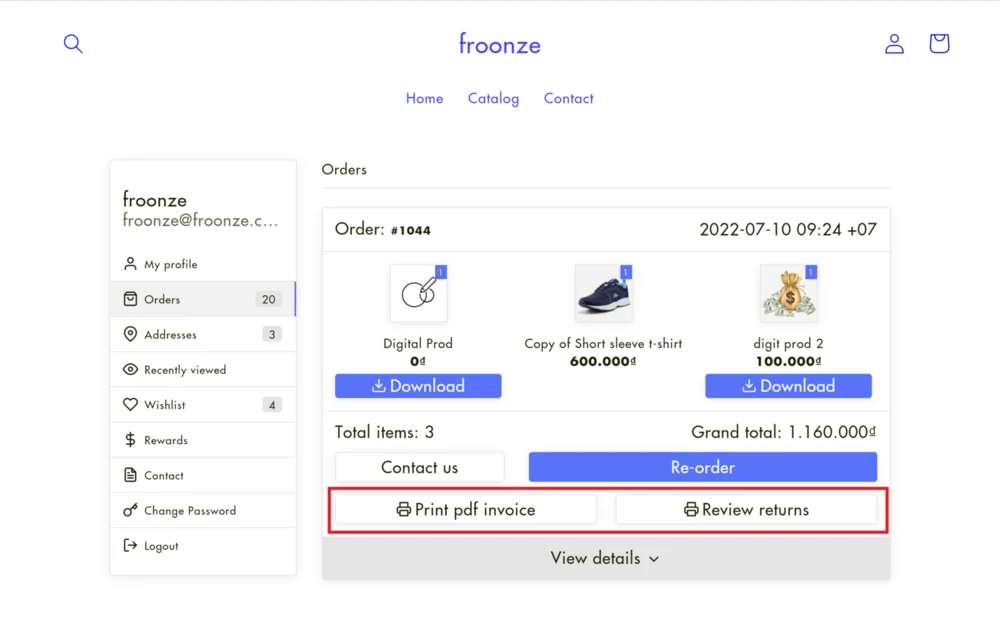
Vify Order Printer PDF Invoice now integrates with the Froonze account page. Every order in the Order History panel gets buttons to print its PDF invoice and review returns, so customers get their documents whenever they need them, without emailing you.
"Can you send me the invoice for my order?" is one of the most common support emails a Shopify store gets, especially from business buyers who need invoices for their accounting. With this integration, customers find the invoice next to the order itself, in the account page they already use to check orders, points and wishlists.
What is Vify Order Printer PDF Invoice?
Vify Order Printer PDF Invoice helps Shopify merchants create professional PDF invoices and other order documents with ease. You can customize invoice layouts by simply checking and unchecking options, with no coding required. With automated invoice generation and email delivery, the app reduces repetitive manual tasks, saves time on order processing, and helps maintain a more consistent invoicing workflow.
Vify Order Printer PDF Invoice is rated 4.9 from more than 1,200 reviews on the Shopify App Store. Its main features:
- Invoices, packing slips and refund receipts from templates you customize without code
- Automatic PDF invoice emails when an order is placed
- Printing and downloading invoices one at a time or in bulk
- B2B VAT numbers shown on invoices automatically
- Language detection, useful for stores that sell internationally
- Unlimited orders on every paid plan, so the price doesn't grow with your order volume
Vify's plans:
| Plan | Price | What you get |
|---|---|---|
| Free | $0 | Your latest 50 orders, customizable templates, invoice downloads for customers, draft orders |
| Starter | $10.99/month | Unlimited orders, bulk processing, automatic PDF invoice emails, invoice editing, custom invoice numbers, no Vify branding |
| Premium | $29.99/month | Everything in Starter, plus more templates, quotes and custom invoices, a custom sender email, commercial invoices and product metafields |
| Ultimate | $69.99/month | Everything in Premium, plus priority live chat support and custom templates made for your store |
Paid plans come with a 14-day free trial, and annual billing saves 17%.
What the integration does
Once you switch it on, Froonze adds Vify download buttons to each order in the Order History panel of your account page, next to the rest of the order details. Customers can:
- Print pdf invoice: download the PDF invoice for any order
- Review returns: see the return documents for an order
The buttons follow your account page design, and you can rename or translate their labels, so they read naturally in every language your store supports.
How to switch on the integration
- Install Vify Order Printer PDF Invoice and set up your invoice template.
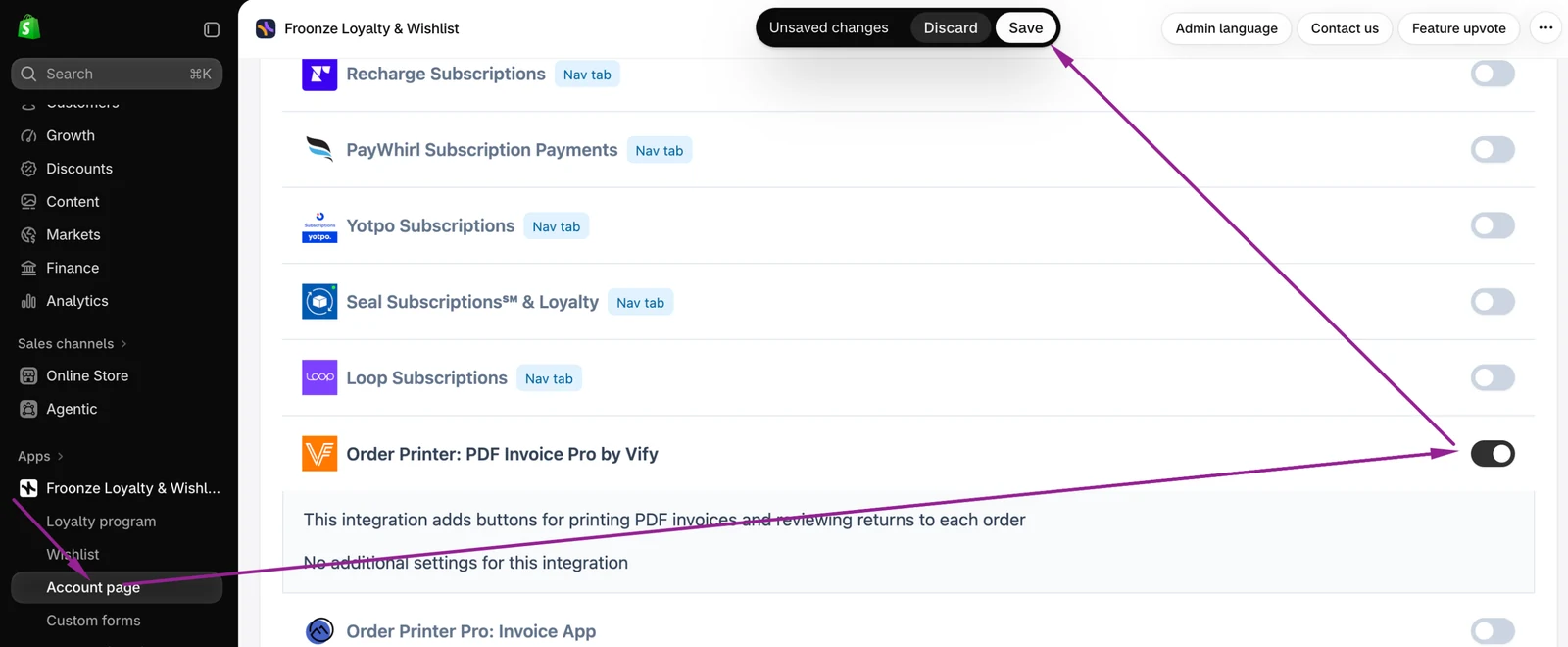
- In Froonze, go to Settings > Account Page > Integrations.
- Select Order Printer: PDF Invoice Pro by Vify and switch on its toggle.
- Click Save in the "Unsaved changes" bar at the top of the page.
That's it. The Vify buttons now show on every order in Order History. To change or translate the button labels, open Translation Settings in Froonze. Step-by-step details are in our help article.