
Redeem points without ever leaving checkout

A native checkout widget, not a redirect.

Show balance, apply discounts, and redeem points right in Order Summary.
Screenshot of the homepage of the Froonze app dashboard
5,000+ Shopify and Shopify Plus stores run on Froonze
5.0/5 on Shopify App Store
The problem

Don't make customers choose between checking out and cashing in

.

If redeeming points means leaving checkout, most customers won't bother, and you lose the AOV lift loyalty is supposed to drive.

Keep the decision right where they're already about to pay.

CHECKOUT REDEMPTION

Redeem points without ever leaving checkout.

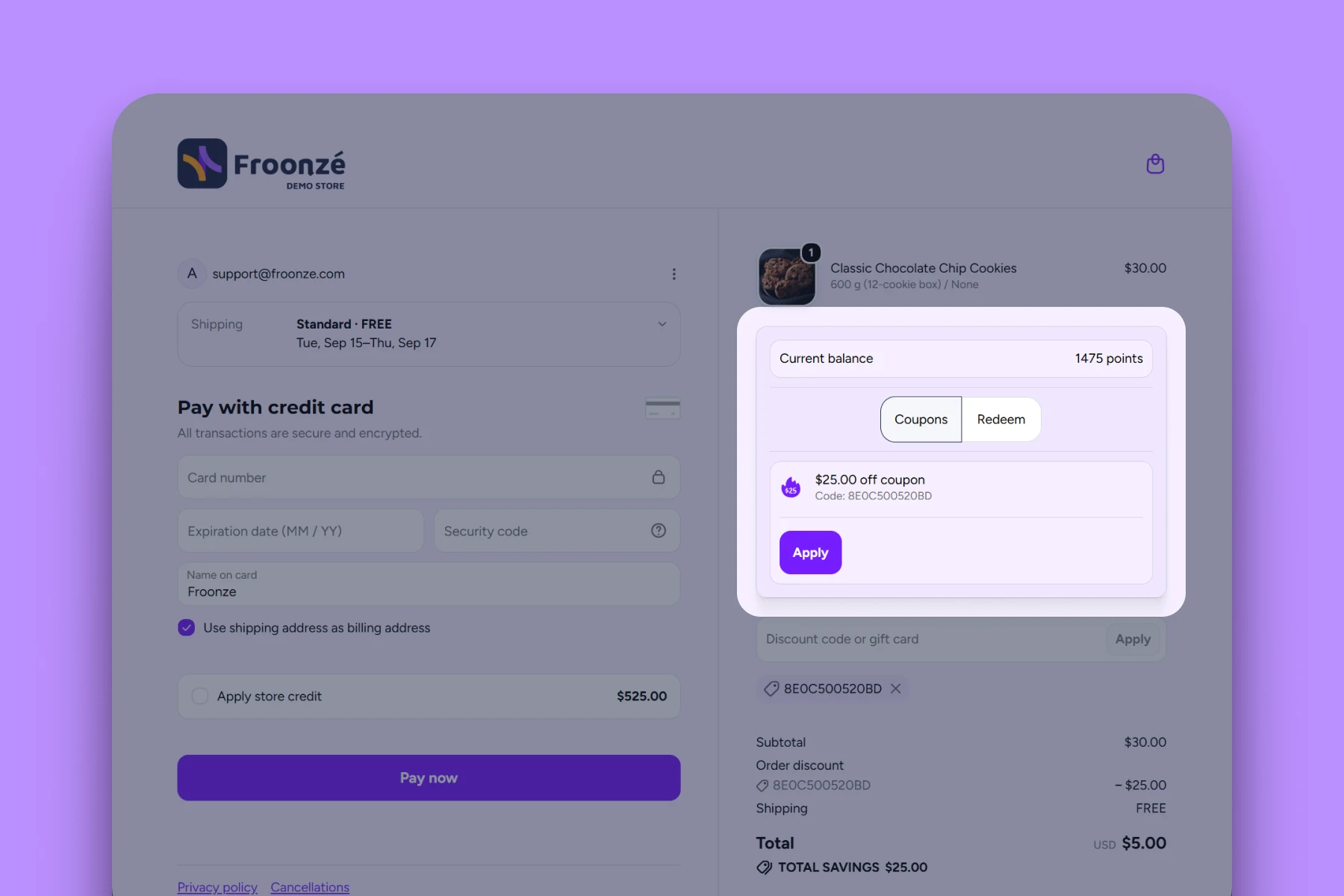
A native checkout widget, not a redirect. Show balance, apply discounts, and redeem points right in Order Summary.

Redeem rewards natively in checkout

Redemption happens right inside Order Summary — no redirect, no second tab, no leaving the page they're already on.

Balance and codes, right there

Customers see their current points balance and can apply a discount code they already have, both without leaving checkout.

Shop Pay checkout, covered too

One toggle extends the exact same widget to Shop Pay, so you're not leaving Shop Pay customers out of redemption.

Shows up only when it matters

The widget appears only when a customer has points, an available discount code, or an active spending rule — never clutter for shoppers it doesn't apply to.

No-code setup, a few clicks

Add the block in Shopify's own Checkout & Accounts Editor and drop it into Order Summary. No developer required.

Works with modern Shopify themes

Compatible with most up-to-date Shopify themes out of the box.
HOW IT WORKS

Live on checkout in a few clicks.

No developer needed — just Shopify's own Checkout & Accounts Editor.
1

Go to Loyalty → Installation → Checkout widget

Opens the Shopify Checkout & Accounts Editor from inside Froonze.
2

Add the widget to checkout

Find it under [All] Apps, press the (+) button, choose "Add to Checkout."
3

Place it in Order Summary and save

Reposition it to a visible spot, then Save to push it live.
4

Optional: turn on Shop Pay

Open the widget's settings, toggle "Include block in Shop Pay" under Checkout behavior, Save again.
BEFORE YOU TURN IT ON

What to know before you enable it.

A few honest limits, straight from Shopify's own checkout rules.

Shopify Plus required

Checkout customization is a Shopify Plus capability, not a Froonze one. Downgrade from Plus, and the widget stops working.

Checkout page only

Works on Shopify's default checkout and Shop Pay. It isn't supported elsewhere, or alongside other checkout discount apps.

Styled by Shopify, not us

It inherits your checkout's native look exactly. There's no custom styling to configure, because Shopify doesn't expose that control.
FAQ Answers

Answering your most frequent questions.

Direct, concise, and real answers that help you understand if we're a good match.
Find the right answers for every stage of your store's journey and size.
Do I need a specific plan for checkout redemption?

Yes. It requires Shopify Plus and the Loyalty Unlimited plan ($60/month).

Does checkout redemption work with Shop Pay?

Yes, there's a separate toggle to include the widget in Shop Pay's checkout too.

Can I style the checkout widget?

No. It inherits your checkout's native look — Shopify doesn't expose styling control for checkout extensions.

Does it work alongside other checkout discount apps?

It isn't supported alongside other checkout discount apps.

When does the checkout widget appear?

Only when it's relevant — if the customer has points, a discount code, or an active spending rule.

Still got questions about Froonze?

We got you covered! Get all your questions answered by the stellar support team at Froonze.
Pretty much every merchant feels like our team is part of their business.

Get Started

Grow your store with Froonze.

Pick and pay only for the plugins you need.
Enjoy a 14-day free trial period.
One MODULAR app
Four Customer tools
Infinite growth
Built for Shopify
5-star rating